Admission Agent

Transform the student and applicant admission process with AI

Reduce operational costs, increase your enrollment rate, and enhance the applicant experience with a solution integrated into Microsoft Dynamics 365.

ícone do copilot

Faster admissions, smarter service.   Automate processes. Win over applicants.   Turn interest into enrollment with AI.

OVERVIEW

What is Admission Agent? Discover the solution that can change everything.

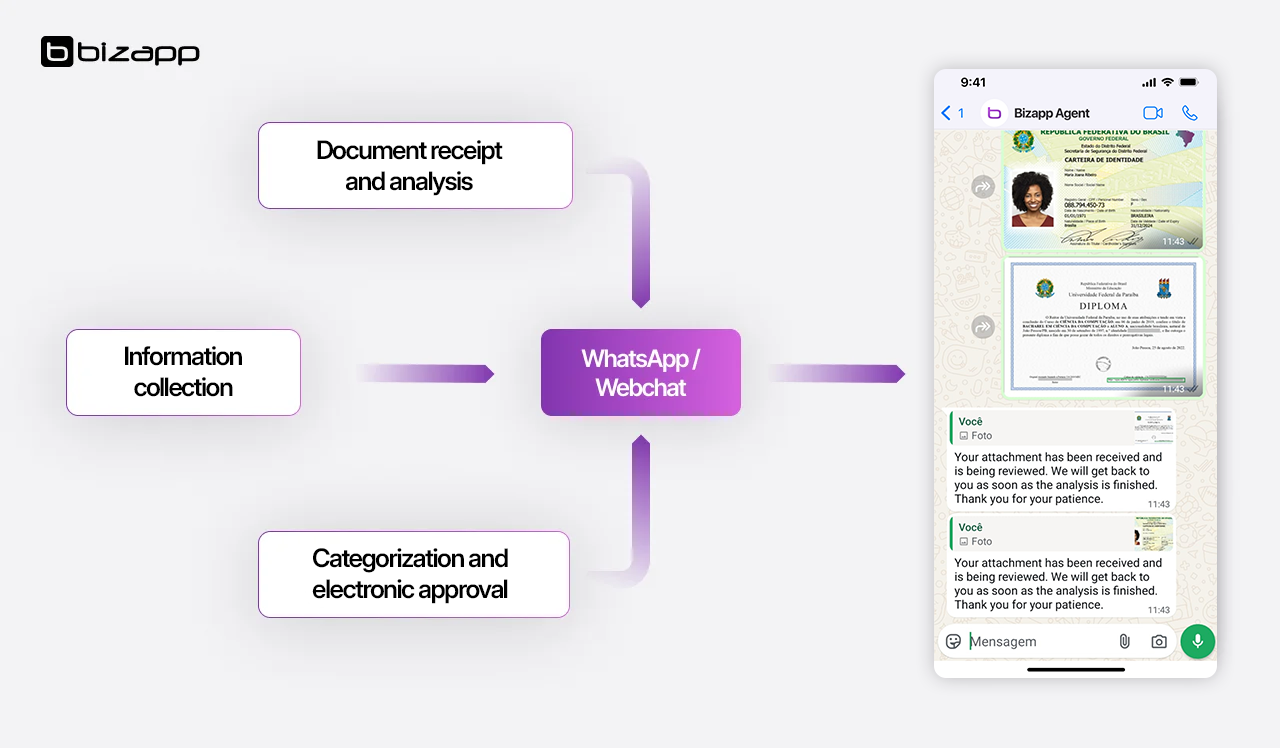
Admission Agent is a solution by Bizapp, developed with Microsoft Copilot Studio, that automates applicant support throughout the entire admission journey — from the first contact to enrollment. With conversational AI, it answers questions in real time, qualifies leads, collects data, and sends everything directly to the institution’s CRM via WhatsApp, webchat, or social media.

PROBLEM

Inefficiency in the process. Direct impact on your business.

Manual and slow application processes

Decentralized and inefficient communication

Overloaded teams with repetitive tasks

Low lead-to-enrollment conversion rate

NEW ERA

Admission Agent. The AI that talks, engages, and converts

Developed with Microsoft Copilot Studio, Admission Agent automates the entire admissions journey — from first contact to enrollment. It answers questions, analyzes documents, updates the CRM, and scales support without scaling your team.

INNOVATION

Not only simplifies the admissions process, but also enhances the customer experience and boosts operational efficiency.

COMPARE

Far more than a chatbot. Discover the power of Admission Agent.

Feature Standard Chatbot Admission Agent
Responds to questions ✅ ✅
Analyzes documents ❌ ✅
Integrates with CRM ❌ ✅
Scales support ⚠️ ✅
Strategic insights ❌ ✅
SOLUTION

Everything you need. Get to know Admission Agent better.

How it works?

Admission Agent acts as an intelligent virtual assistant that engages with applicants via chat, WhatsApp, or social media. It answers questions in real time, collects data, qualifies profiles, and automatically routes them to the right team. All of this is integrated with the institution’s CRM and educational systems, with reports that generate insights for faster, more strategic decisions.

Educational institutions looking to scale and qualify their student recruitment process benefit the most.

Among them: Universities and colleges; Technical and vocational schools; Independent and preparatory courses; Private K-12 school networks;

Target personas: Marketing and admissions directors and coordinators; Student relationship managers; Support and pre-sales teams; Technology and digital transformation professionals;

Copilot Studio integrates seamlessly with other Microsoft solutions like Dynamics 365 and Power Platform, creating a robust ecosystem that enhances every aspect of your business. This integration streamlines the connection between data, processes, and teams, providing a holistic and strategic view for business success.

Admission Agent is a solution designed to transform admissions into intelligent, automated, and personalized processes.
With low-code development, fast implementation, and full CRM integration, it delivers efficiency from the first contact to enrollment — all backed by experts in data, automation, and the student journey.

GET IN TOUCH

Optimize your admissions journey with AI

Página de teste — Widget Bizapp Agente Comercial

Este conteúdo é apenas um exemplo de página para simular o site institucional durante os testes do widget de chat. Ele não faz parte do código do widget.

O que testar aqui (correção do corte no iPhone):

• Abra esta página no Safari do iPhone e clique no botão flutuante — o cabeçalho roxo (com o botão de fechar) deve aparecer inteiro no topo do popup, sem ser cortado.

• Role a página para cima/baixo antes de abrir o chat (para a barra de endereço do Safari mostrar/esconder) e confirme que o popup continua correto ao abrir depois.

• Gire o celular entre retrato e paisagem com o chat aberto — o popup deve se readaptar sem cortar o cabeçalho.

Role a página, redimensione a janela do navegador e interaja com o botão flutuante no canto inferior direito para validar o comportamento completo do widget.